11.13. Perspective Projection Homework
Use perspective projection geometry with a camera matrix to project a 3D model onto an image. Part of the code is in file below that you can use. Create an image of a scene with some cubes (boxes) in 3-D. Start with a 3D model in Euclidean coordinates, convert to 3D image coordinates, and then use projective geometry and a camera matrix to map each cube to an image.
Your image might look as follows.
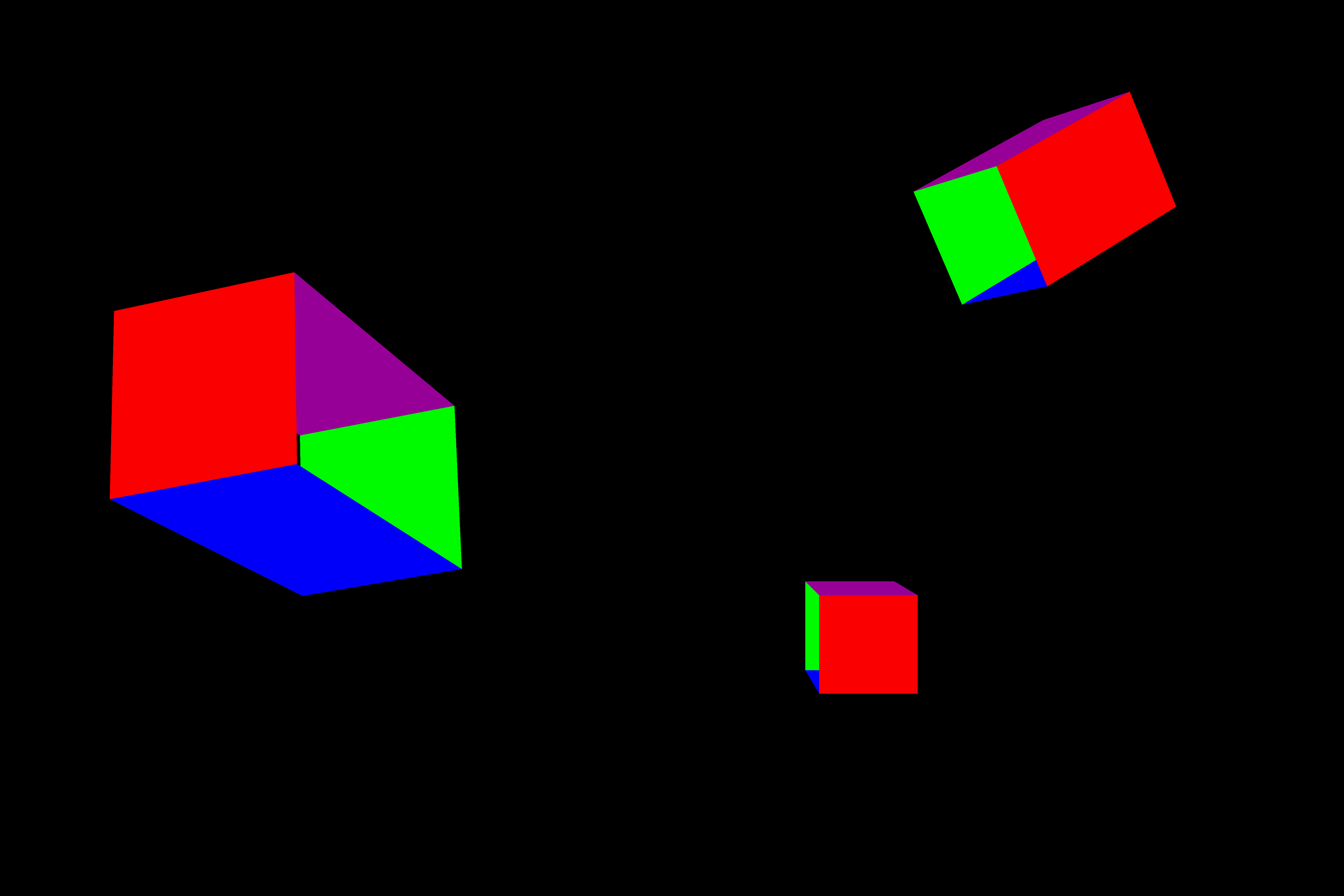
The cubes should be able to placed anywhere in the model at various size, position, and orientation.
To complete the code, you will need to:
Supply the code for a function that implements projective geometry with a camera matrix (see Camera Matrix).
Convert the coordinates of image points from Euclidean to image coordinates.
Make a 3D rotation matrix to rotate points in Euclidean coordinates.
Submit both your Python script and PNG image file.
# -*- coding: utf-8 -*-
"""
file: cubesToImage.py

Create an image of a scene with some cubes (boxes) in 3-D.
Start with a 3-D model in Euclidean coordinates,
convert to 3-D image coordinates, and then use projective geometry
and a camera matrix to map each cube to an image.
"""

from PIL import Image, ImageDraw
import numpy as np
import math

def projectToImage(camera: np.array, point: np.array) -> tuple:
    # project a point to the image plane from a camera matrix

    # You complete this function

def imageCoord(point: np.array):
    # Convert 3D euclidean coordinates to 3D image coordinates

    # You complete this function

def drawCube(draw, Camera, cube):
    # map and draw Eucliean model of a cube onto an image
    cubeic = [imageCoord(x) for x in cube]
    icube = [projectToImage(Camera, x) for x in cubeic]

    # Draw the filled boxes
    back = icube[4:]
    front = icube[:4]
    ulf, urf, lrf, llf, ulb, urb, lrb, llb = icube
    # left = [ulf, ulb, llb, llf]
    # right = [urf, urb, lrb, lrf]
    top = [ulf, ulb, urb, urf]
    bottom = [llf, lrf, lrb, llb]
    draw.polygon(back, fill=(0, 250, 0))
    draw.polygon(bottom, fill=(0, 0, 250))
    # draw.polygon(left, fill=(0, 150, 150))
    # draw.polygon(right, fill=(150, 150, 0))
    draw.polygon(top, fill=(150, 0, 150))
    draw.polygon(front, fill=(250, 0, 0))
    # return draw

def make3Dcube(center: np.array,
            width: float,
            height: float,
            depth: float,
            xrot: float,
            yrot: float,
            zrot: float) -> list:
    # create the 8 corners of a 3D cube - Euclidean geometry
    cx = math.cos(math.radians(xrot))
    sx = math.sin(math.radians(xrot))
    cy = math.cos(math.radians(yrot))
    sy = math.sin(math.radians(yrot))
    cz = math.cos(math.radians(zrot))
    sz = math.sin(math.radians(zrot))

    # You create the 3D rotation matrix R


    w2 = width / 2
    h2 = height / 2
    d2 = depth /2
    llf = center + R @ np.array([[-d2, w2, -h2]]).T
    lrf = center + R @ np.array([[-d2, -w2, -h2]]).T
    ulf = center + R @ np.array([[-d2, w2, h2]]).T
    urf = center + R @ np.array([[-d2, -w2, h2]]).T
    llb = center + R @ np.array([[d2, w2, -h2]]).T
    lrb = center + R @ np.array([[d2, -w2, -h2]]).T
    ulb = center + R @ np.array([[d2, w2, h2]]).T
    urb = center + R @ np.array([[d2, -w2, h2]]).T
    return [ulf, urf, lrf, llf, ulb, urb, lrb, llb]

# Create a new black image (RGB mode)
width, height = 6000, 4000
u0, v0 = 3000, 2000
img = Image.new('RGB', (width, height), color=(0, 0, 0))

# Initialize the drawing context
draw = ImageDraw.Draw(img)

# camera matrix
f = 50 # mm
fx = f*width/36
fy = f*height/24
C = np.array([[fx, 0, u0, 0], [0, fy, v0, 0], [0, 0, 1, 0]]).astype(float)

c1 = np.array([[100, -15, -10]]).T.astype(float)
cube1e = make3Dcube(c1, 8, 10, 15, 10, 10, 15)
drawCube(draw, C, cube1e)

c2 = np.array([[50, 10, 0]]).T.astype(float)
cube2e = make3Dcube(c2, 5, 5, 10, -5, 20, -15)
drawCube(draw, C, cube2e)

c3 = np.array([[75, -15, 10]]).T.astype(float)
cube3e = make3Dcube(c3, 8, 5, 5, -25, -10, 30)
drawCube(draw, C, cube3e)

# Show the resulting image
img.show()

# Optional: Save the image to a file
#img.save("rendered_image.png")